If you’ve recently bought one of the Ninja Luxe Cafe coffee machines, you may be experiencing problems that lead to poor-tasting espresso, which you probably weren’t expecting!
If so, fear not. This is very common with all espresso machines, and in most cases, the solutions are incredibly simple. In fact, there may be nothing to fix at all ;-), I’ll explain.
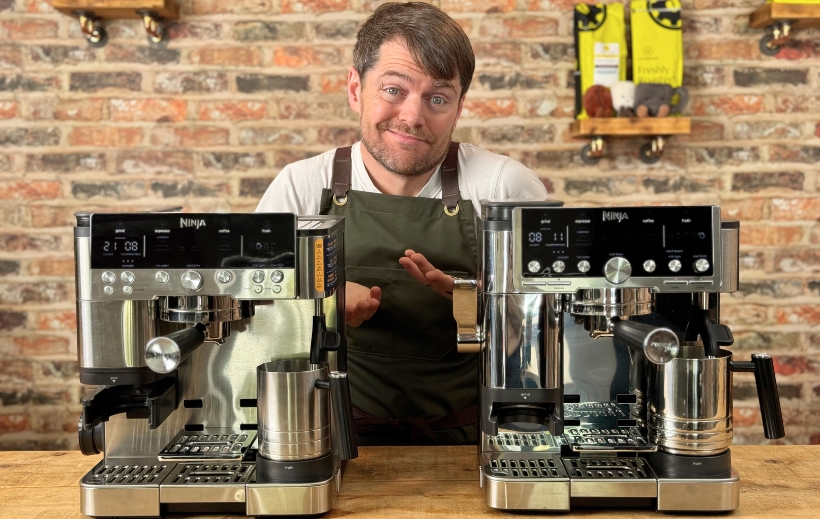
What Do I Know About the Ninja Luxe?
If you’re wondering why I’m qualified to talk about Ninja Luxe-related problems and solutions, the simple answer is I’ve investigated the issues and discovered the solutions.
I was among the first in the UK to buy the Ninja Luxe Cafe Premier. I imported it from America before it was released in the UK, as I wanted to review it on my YouTube channel.
I then grabbed the UK version as soon as that was available, and also the Ninja Luxe Cafe Pro on the day it was launched.
We started to get lots of questions at The Coffeeworks about which coffee beans were best suited to the Ninja Luxe, and whenever we’ve had customers describing issues with the Luxe, I’ve investigated so we could give the right advice.
I’m not big on “tooting my own horn”, which is a weird saying, but I will say that I doubt there are many people who’ve had as much hands-on experience with the Ninja Luxe machines as I have.
Issue 1: Faulty Ratio/Strength Setting
Brew ratio is the relationship between the weight of the dose (the amount of ground coffee in the basket) and the weight of liquid espresso, so if the weight of the espresso is double the weight of the dose, it’s a 1:2 ratio.
The strength setting is intended to control the brew ratio, but in many cases, it appears that a fault is causing an inconsistent brew ratio.
Correct Ratio Settings
If working correctly, the strength settings should convert to the following ratios:
Setting 1: 1:4 (18 x 3) 72 grams
Setting 2: 1:2.5 (18 x 2.5) 45 grams
Setting 3: 1:2 (18 x 2) 36 grams
Setting 2 is the default, so if you’ve not changed the strength, you should find you’re getting roughly 45 gram shots.
Brew ratio is an essential part of the espresso recipe; if it changes, it can completely mess up the shot.
There appears to be a fault in some units, including my Ninja Luxe Cafe Premier, where the ratio setting just has a mind of its own.
With mine, the shot volume on setting 3 is usually at least a few grams over, unless I removed the cup just before it’s officially finished, but the main issue is the inconsistency. One espresso shot will be around 42-43 grams, but the next shot could be 50 grams or more, and sometimes it’s more like 80 grams.
Here’s the problem: if the recipe for the beans you’re using calls for a 1:2 ratio, and you get a 1:4, it’ll probably taste terrible.
The Solution: Use Brew Scales And Contact Ninja Support
The first thing I’d recommend is to report this to Ninja. Ninja’s customer support appears to be really good, and from what I’ve heard, they’re replacing models that have this issue.
This is a case of do what I say, not what I do, as I’ve not done this with mine ;-). If this were my home machine, though, I’d definitely be getting in touch with Ninja support.
They don’t need to be expensive, a $20-$30 set of coffee scales will be fine. You can simply put your scales on the drip tray and keep an eye on the shot weight. If you reach your desired ratio and the shot is still going, you can just stop the shot manually.
Slightly Inconsistent Ratio Is Normal
I think everyone who has an espresso machine should have scales for measuring the shot weight when dialling in.
Even if your Ninja Luxe Cafe doesn’t have this fault, you’ll still get some inconsistency in shot volume and therefore ratio when you’re switching beans and tweaking the grind size, so it’s very difficult to dial in if you don’t know what your actual brew ratio is.
Most espresso machines, as with the Ninja Luxe, have volumetric shot control, which controls how much water flows through the group.
How much espresso ends up in your cup depends not purely on the amount of water dispensed via the pump, but also on how much water is retained in the grounds. So, you’ll always get inconsistent volumes when you’re changing beans and/or grind size.
Espresso Needs a Recipe?
Yeah, Espresso requires a recipe, just like making anything else tasty, and the ratio is a key part of the recipe.
You’ll be aware that when baking a cake, for example, something I’m fairly certain I’ve never done ;-), the number of eggs is a key part of the recipe.
If you were randomly changing the quantity of eggs without altering the rest of the recipe, you probably wouldn’t make it to the second episode of Great British Bake Off ;-).
When we talk about an espresso recipe, we’re referring to:
- Dose, which means the weight of coffee in the basket
- Yield, which means the weight of the espresso
- Ratio, which is the relationship between the dose and the yield
- Brew temperature, which means the temperature of the water entering the basket
- Shot Time, which means how long the shot takes to complete, from pressing the button, we control this with the grind size
Issue 2: Over-Reliance on Barista Assistance
Symptoms: Confusion & Poor-Tasting Espresso
Some Ninja Luxe Cafe owners get frustrated because they set the grinder to the recommended setting, but their coffee tastes bad, leading them to believe there’s a problem with the coffee beans or the machine.
The thing is, the Barista Assistance feature is just a rough guide.
Most people will probably find that with most coffee beans, they’ll get close enough to being dialled in (meaning they’re getting a well-balanced shot) just by setting the grind size as suggested.
But with some beans, the assistance will be way off, and the espresso will taste weird as a result.
The Solution: See the Suggested Grind Size Purely as a Guide
You’ve pulled three or four shots, and it seems like the machine has made up its mind on what grind size you should be using, but something doesn’t taste right?
This is completely normal. So instead of thinking “this tastes like crap, it must be a problem with the machine or the beans”, think “Ah, the assistance is a bit off for this bean, I need to tweak slightly.
Ignore the Barista Assistance
If the espresso tastes fine and the Ninja Luxe barista assistance suggests a change for some reason, just ignore it.
Your taste buds are the ultimate judge, and the assistance may be just having a blip, which is common, particularly with the Premier 601. I’ve noticed this too on the 701, but not as often as with the 601.
Under Or Over Extraction?
If your taste buds are telling you something isn’t right, it’ll more than likely be down to either under- or over-extraction.
- Sourness: under-extraction.
- Bitterness: over-extraction.
Whether you’re tasting bitterness or sourness, though, isn’t as simple as it sounds. If you’re new to tasting espresso, you’ll probably just know it tastes “bad”.
So what I’d recommend is making an educated guess based on the beans and then doing a test to see if your guess was correct.
Adjust The Grind Size
- Medium/Dark to Dark Roasts: Adjust the grind one or two settings finer than the Barista Assistance suggests.
- Medium Roasts: Adjust the grind size one or two clicks finer than the Barista Assistance suggests.
The above isn’t infallible, but it’s OK as a rough rule of thumb. Most issues in taste will be down to over- or under-extraction, and it’s more likely to be under-extraction with medium roasts, and over-extraction with darker roasts.
In other words, the assistance (which can only go off a shot time) might be suggesting slightly too fine a grind for darker roasts, and slightly too coarse a grind for lighter roasts.
If you make this adjustment, and it tastes worse, you know you’ve guessed in the wrong direction, so try doing the opposite, and see if that helps.
Adjust the Brew Ratio
If you’re confident that you’re going in the right direction, you can go further with the grind size; just continue in that same direction.
You can also decide to leave that part of the recipe alone, though, and change another, as long as you’re only changing one thing at a time.
The most obvious thing to change in addition (remember, not at the same time) to grind size is brew ratio.
You wouldn’t want to make a huge change to the ratio, because this also changes the body and intensity, but relatively small tweaks to the ratio can really help.
So let’s say you’re trying to extract less (to combat over-extraction), you could just change the strength setting (or manually stop the shot slightly sooner) to pull a slightly smaller shot with the same dose.
If you’re going in the opposite direction to correct under-extraction, you could adjust the strength setting to increase the ratio.
Issue 3: Using the Wrong Coffee Beans
Symptoms: Can’t Grind Fine Enough & Poor-Tasting Espresso
The Ninja Luxe is only intended to be used with freshly roasted coffee beans, and it’s not suited to ALL types of freshly roasted beans.
If you ignore Ninja’s advice to only use freshly roasted coffee beans and just grab a bag of beans from the supermarket, that’s fine, but the barista assistance probably won’t work at all.
If you buy freshly roasted beans, but you’re buying light to medium roasts, you’ll probably have a similar issue, but for completely different reasons.
The Solution: Buy Freshly Roasted Medium/Dark Roast Coffee Beans
- Avoid “light”, light/medium & medium roast freshly roasted coffee beans
- Avoid coffee beans without a roast date
The Issue With Supermarket Beans
With most “normal” (meaning, not fresh, they don’t come with a roasted-on date on the bag) coffee beans, no matter how fine you take the grind, the Assistance will want you to grind finer.
If you’ve got beans like this, and you don’t want to waste them, just ignore the assistance or turn it off in the advanced settings. You’ll probably find the espresso will taste pretty much “OK” regardless of the shot time.
You don’t really need to dial in with beans without a roasted-on date. If you want to use them, just slap them in the hopper. Experiment with the grind size if you like, but it’s unlikely to make much difference.
The Issue With Medium Roast Fresh Coffee Beans
For freshly roasted coffee, the term “medium” covers quite a range, and some can require a particularly fine grind, depending on the altitude they were grown, and the processing method.
You’ll find that some medium roast beans are fine with the Ninja, while some will be a pain. Generally speaking, I’d expect fewer issues with medium roast Brazilian beans, and the higher the altitude, the more likely I’d expect issues.
So, SHG (strictly high-grown) medium roasts, for example, particularly washed processed SHG beans, would definitely be an issue with the Ninja, and with many other integrated grinder espresso machines.
Best Coffee Beans for Ninja Luxe Cafe
The best coffee beans for the Ninja Luxe Cafe (all the machines, Luxe Essential, Premium & Pro) in my humble yet experienced opinion (I’ve tried lots) are medium/dark roast blends.
Some medium/dark to dark roast single origins will be fine, too, but single origins can always be a challenge for integrated grinder machines, even if they’re not lighter roasts.
Is There Actually a Problem to Solve? Try These Suggestions First.
Stir Your Espresso Before Tasting
I’d always recommend stirring your espresso before tasting if you’re tasting espresso neat.
The different parts of the shot all taste different, and if you don’t believe me, try a “salami shot”, which doesn’t mean putting sausage in your coffee.
This is where we split a shot into 3-5 different cups, and taste each part separately, and this is an exercise that is well worth doing if you’re wanting to improve your palate for espresso.
You’ll notice each part tastes different, and the last part of the shot usually tastes the most bitter, so this illustrates why it makes sense to stir your espresso.